Dev testing 10/9 · commented 9 October 2026 · assigned to Shoaib Akhtar
Project Information — Shoaib’s tasks
Everything in the testing doc tagged to Shoaib, written as tasks. Most of it is the Project Information form, first for a Consumables project and then for an Assets one. The rest is the Files step of an Assets project. Each comment is pinned to a screenshot, so each group shows the screenshot with its comment under it.
- Tasks
- 32in two forms and the files step
- Comments
- 20all by Peter Stahl
- Removals
- 13fields and whole sections
- Open questions
- 4from reading the comments
Don’t ask for anything the project already knows, and make the rest optional. The Consumables form shrinks to Client & Timeline, with scope folded into it, and Site Access & Logistics as section 2. The Assets form keeps its sections but drops whatever comes from project setup or the roster. The reference files from Start a Project get their own section at the bottom, where they can be swapped.
Consumables formProject Information Guidance · T1–T18
Sections 1–8 as they are today. Five of them go, and Site Access & Logistics moves up to section 2.
Section 1 · Client & Timelinefour fields go, two change
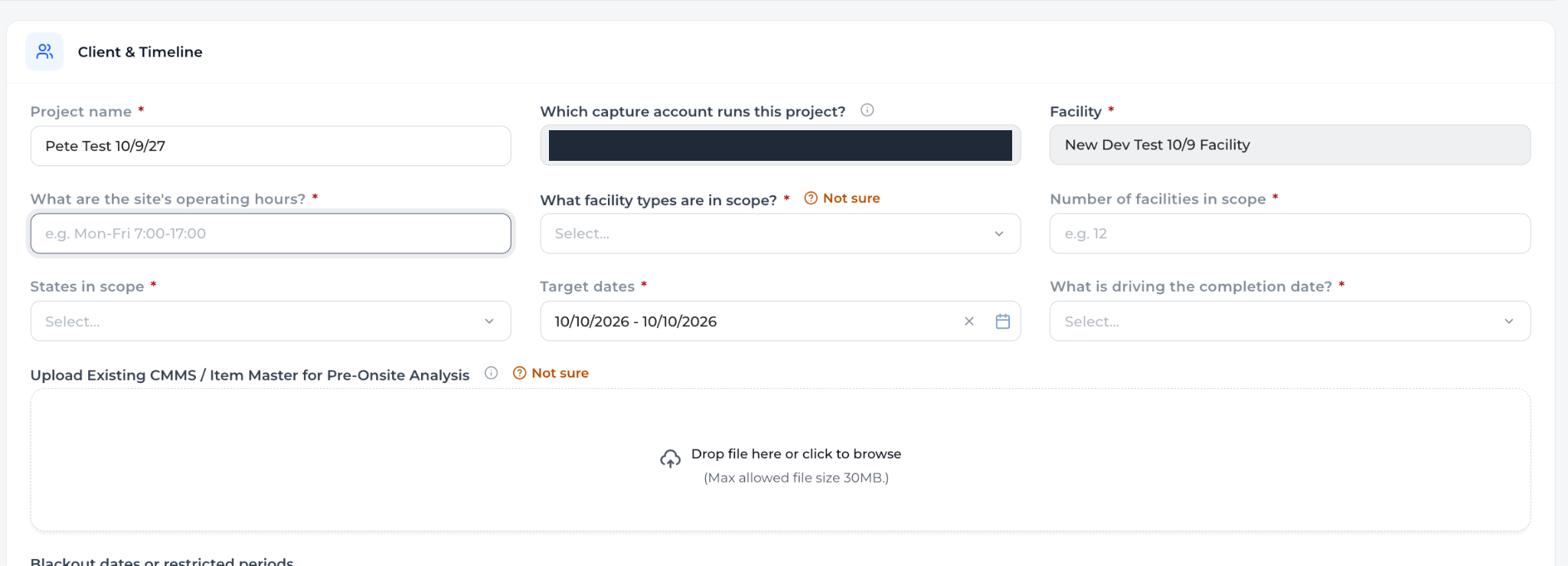
on the screenshot above1) Operating Hours 1a. Change Capture Start Time - Input Time Field 1b. Planned Capture End time - Input Time Field (Required but can change)*
2) What facility types are in scope - Since the user selected 1 facility or created 1 we assume its 1 so just change to Facility Type and select only 1 option if 1 facility in scope (likely scenario) - Default to Acute
3) Remove # of facilities in scope it default inherits what the user selected at project creation - If i select 1 facility its 1.. If i selected a group then any facility under that group and or created later would add to the count
4. States In scope Remove - I already at creation gave the facility Address so just show the Address here.
5. Remove Whats driving completion date
6. Remove Upload existing CMMS - Not relevant for consumables flow
Peter Stahl · 9 Oct · C2
- T1Replace “What are the site’s operating hours?” with two time inputs: Capture Start Time and Planned Capture End Time.Required, but can be changed later.change
- T2Rename “What facility types are in scope?” to Facility Type. With one facility in scope, the usual case, allow one choice only. Default to Acute.change
- T3Remove “Number of facilities in scope”. It comes from project creation: one facility counts 1, a group counts every facility in it, including ones added later.remove
- T4Remove “States in scope” and show the facility’s address instead, as entered at creation.change
- T5Remove “What is driving the completion date?”.remove
- T6Remove “Upload Existing CMMS / Item Master”. It does not apply to the consumables flow.remove
Section 2 · Blackout datesgoes on both forms

on the screenshot aboveRemove entirely here both for consumables and assets for now
Peter Stahl · 9 Oct · C3
- T7Remove blackout dates from both the Consumables and the Assets form, for now.remove
Section 3 · Locations & Scopethe fields go, scope moves to section 1

on the screenshot aboveRemove all
Peter Stahl · 9 Oct · C4

on the screenshot aboveSimplify - Move to section 1 and just call it Scope - Default all selected allow them to unselect - 1 field not sections (not required)
Peter Stahl · 9 Oct · C5
- T8Remove the off-site locations, project domain, data-bearing devices and explicitly excluded fields.remove
- T9Move subcategories into section 1 as a single field called Scope. Everything is selected by default and can be unselected. Not required.Replaces the Include / Skip / Not sure lists.change
Sections 4 & 5 · Existing Asset Data, Capture Requirementsboth go
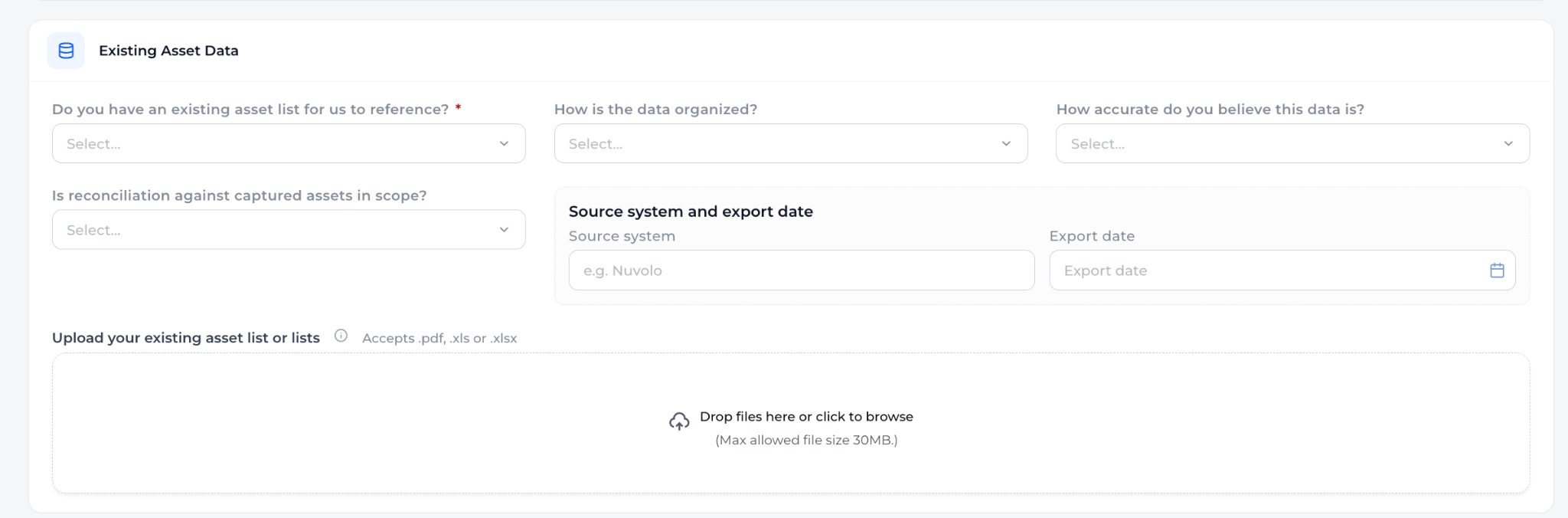
on the screenshot aboveRemove all
Peter Stahl · 9 Oct · C6
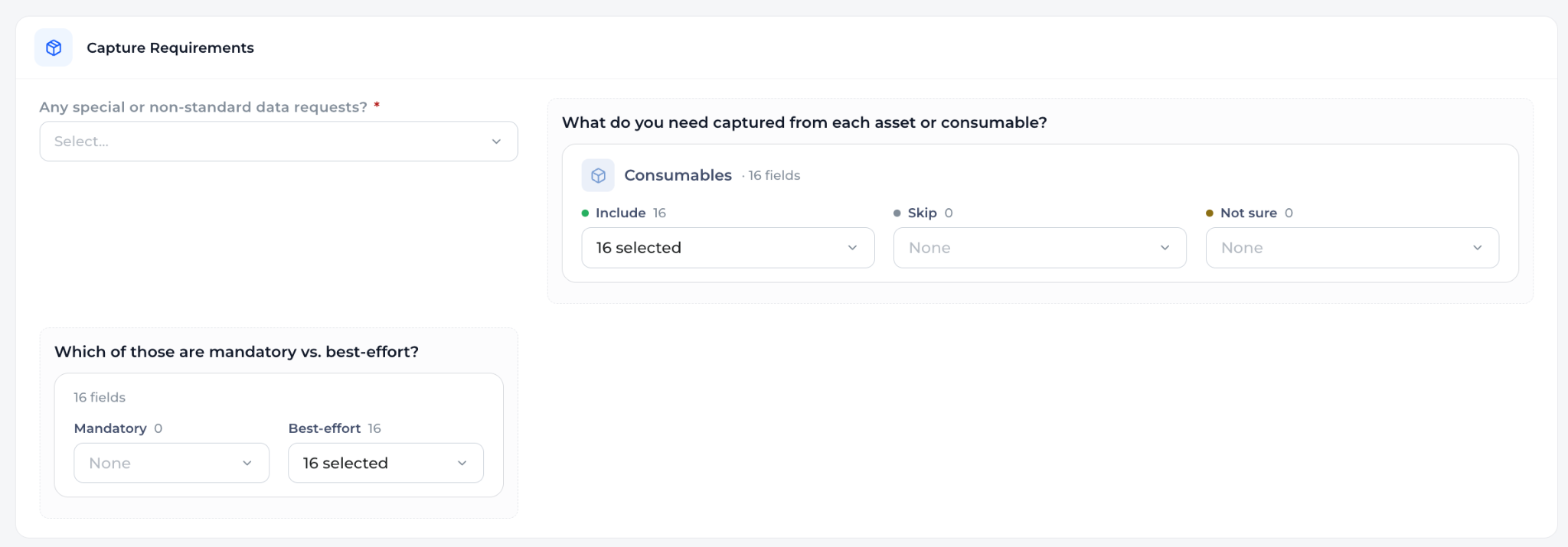
on the screenshot aboveRemove Section
Peter Stahl · 9 Oct · C7
- T10Remove section 4, Existing Asset Data.remove
- T11Remove section 5, Capture Requirements.remove
Section 6 · Site Access & Logisticsbecomes section 2
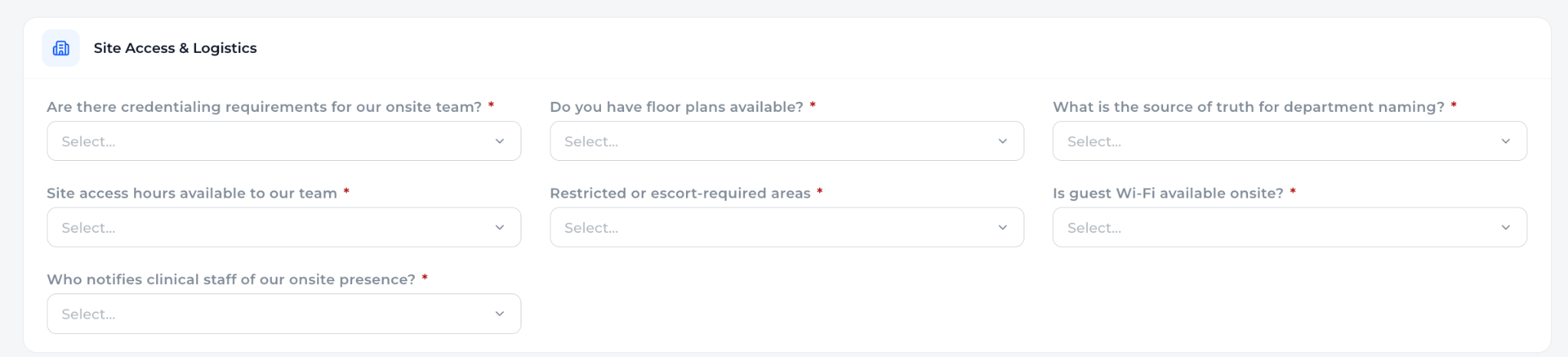
on the screenshot aboveBump up > Now Section 2; Nothing field wise here required
Do you have floor plans available? - Remove
What is the source of truth for department naming? - Remove
Site access hours available to our team - Remove we asked start time in section 1 now
Who notifies clinical staff of our onsite presence? Update to On-site point of contact - 3 fields - Name, Email, Phone # - Ability to add more than one contact +
Peter Stahl · 9 Oct · C8
on the screenshot aboveAnother thing we want to note - any rooms/areas need prioritized to go in the AM or Afternoon? Yes > Select
Peter Stahl · 9 Oct · C9
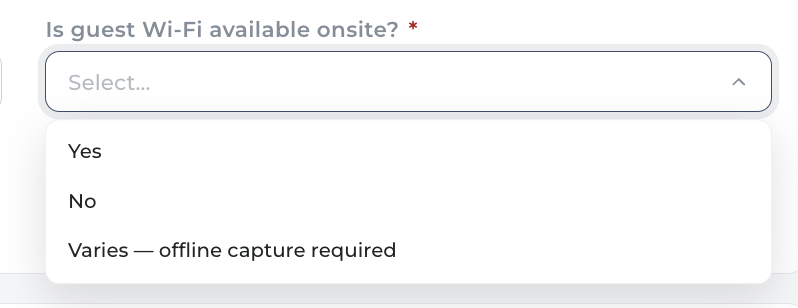
on the screenshot aboveOptions: Yes, No, Unknown
Peter Stahl · 9 Oct · C10
- T12Move Site Access & Logistics up to become section 2, with no required fields.change
- T13Remove floor plans, the source of truth for department naming, and site access hours.Start time is now asked in section 1 (T1).remove
- T14Replace “Who notifies clinical staff of our onsite presence?” with On-site point of contact: Name, Email and Phone, with a + to add more contacts.change
- T15Ask whether any rooms or areas need to go first, in the morning or the afternoon. On Yes, let them pick which.add
- T16Guest Wi-Fi options become Yes, No, Unknown.Today: Yes, No, Varies — offline capture required.change
Sections 7 & 8 · Systems & Intent, Delivery & Acceptanceboth go
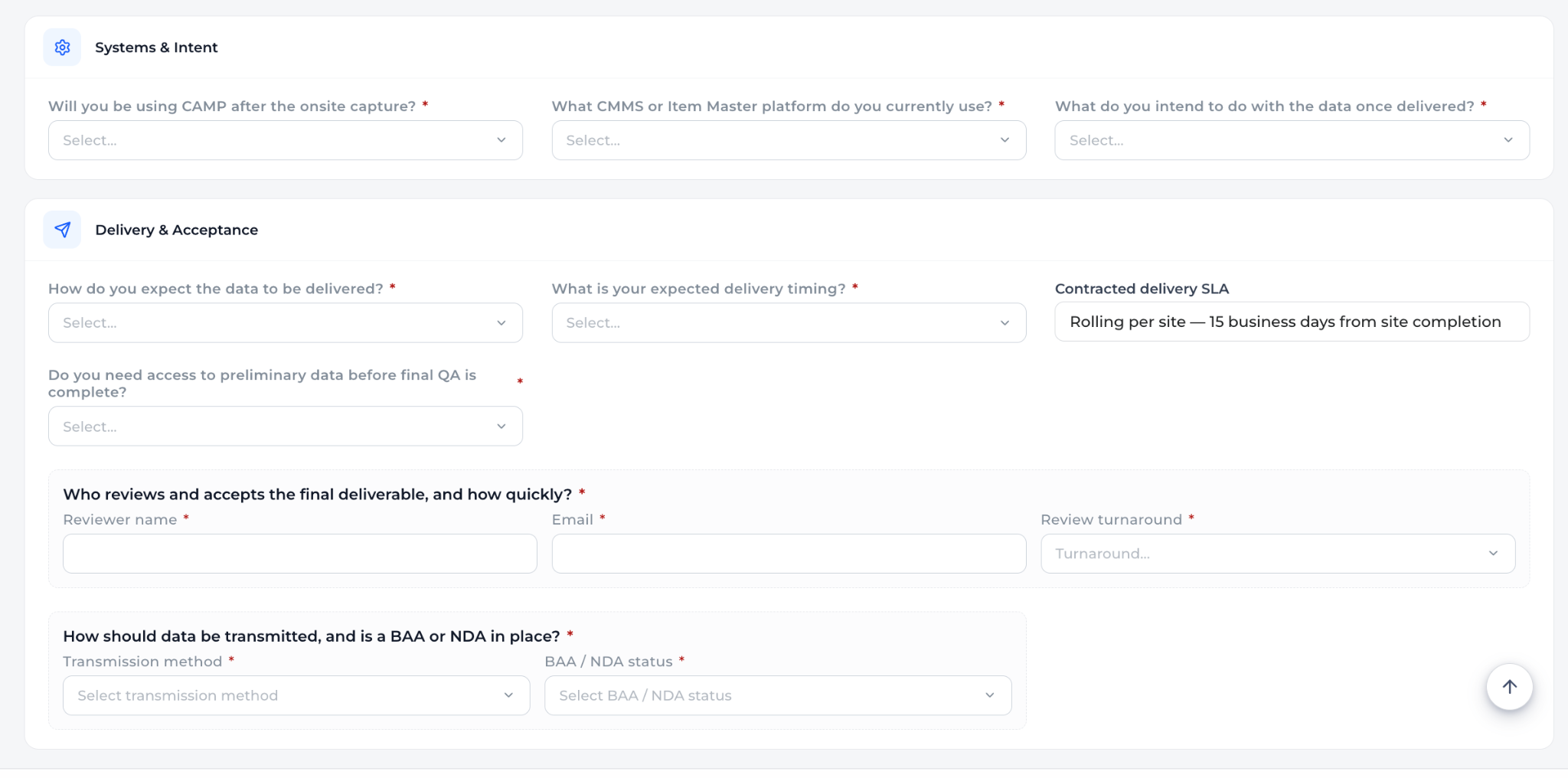
on the screenshot aboveDelete both sections
Peter Stahl · 9 Oct · C11
- T17Remove sections 7 and 8 from the Consumables form.The Assets form keeps both, with every field optional (T25–T27, Q1).remove
Reference filesfrom Start a Project → Files
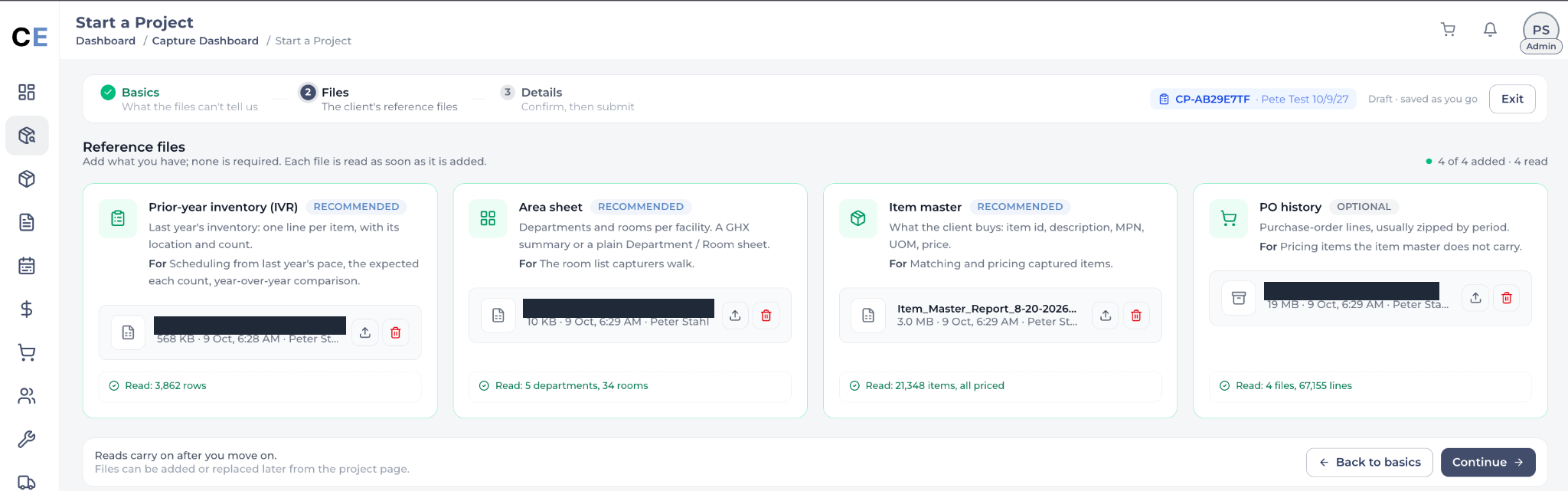
on the screenshot aboveI filled these out earlier in the project I should see this section under project information at the bottom as if a file changes I may want to change out the one on file - also impacts jayas agent(s)
Peter Stahl · 9 Oct · C12
- T18Add a reference files section at the bottom of Project Information. It shows the files uploaded when the project was started, and each one can be replaced.A replaced file also feeds Jaya’s agent(s).add
Assets formProject Information · T19–T27
The same form for an Assets project. Here the sections stay, and the comments cut fields and make the rest optional.
Client & Timelinetighter, and four fields go
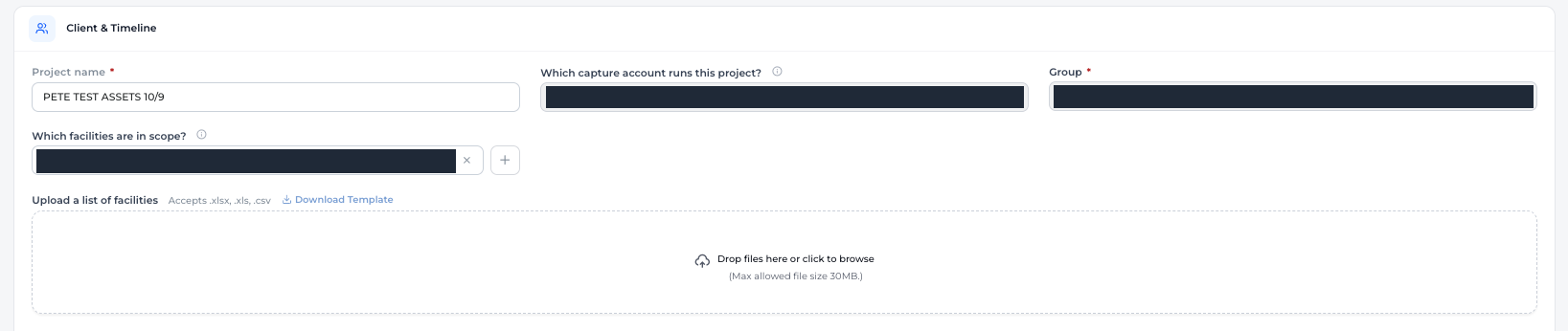
on the screenshot aboveMove Upload facilities to right of select facilities section to tighten space
Peter Stahl · 9 Oct · C21
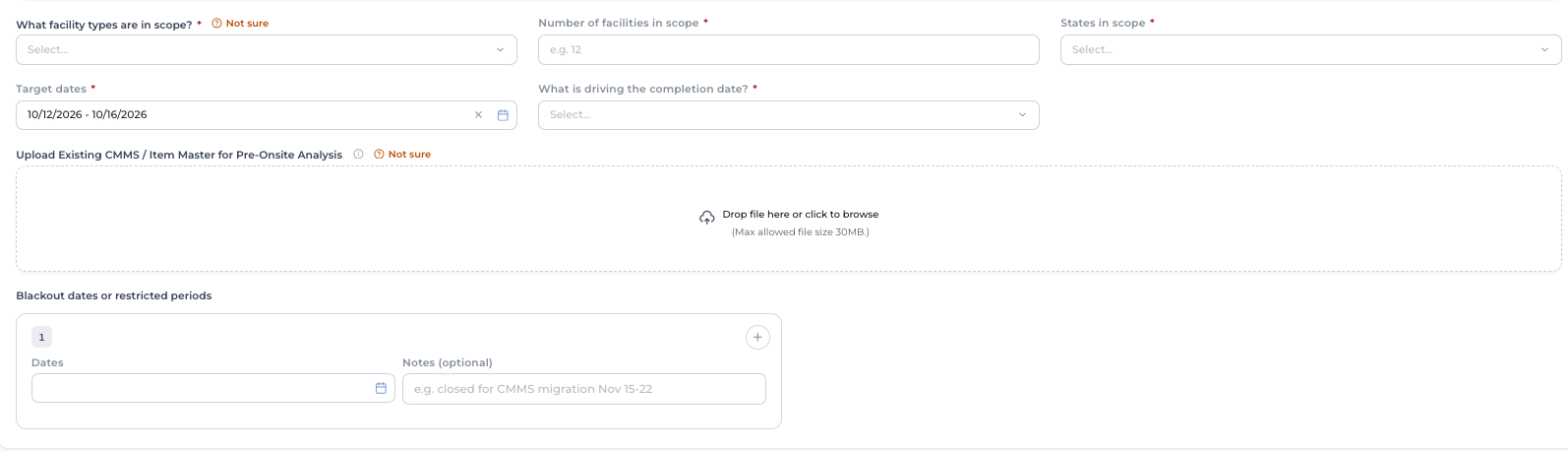
on the screenshot above-# of facilities comes from their roster remove
-States come from their roster remove
-Upload CMMS remove we did that earlier / should have its own section at bottom for files uploaded
-Blackout dates remove
Peter Stahl · 9 Oct · C22
- T19Put “Upload a list of facilities” to the right of “Which facilities are in scope?” to save space.change
- T20Remove number of facilities and states in scope (both come from the roster), the CMMS upload, and blackout dates.The CMMS file goes to the reference files section at the bottom (T18). Blackout dates: T7.remove
Locations & Scopeproject domain goes, the rest optional
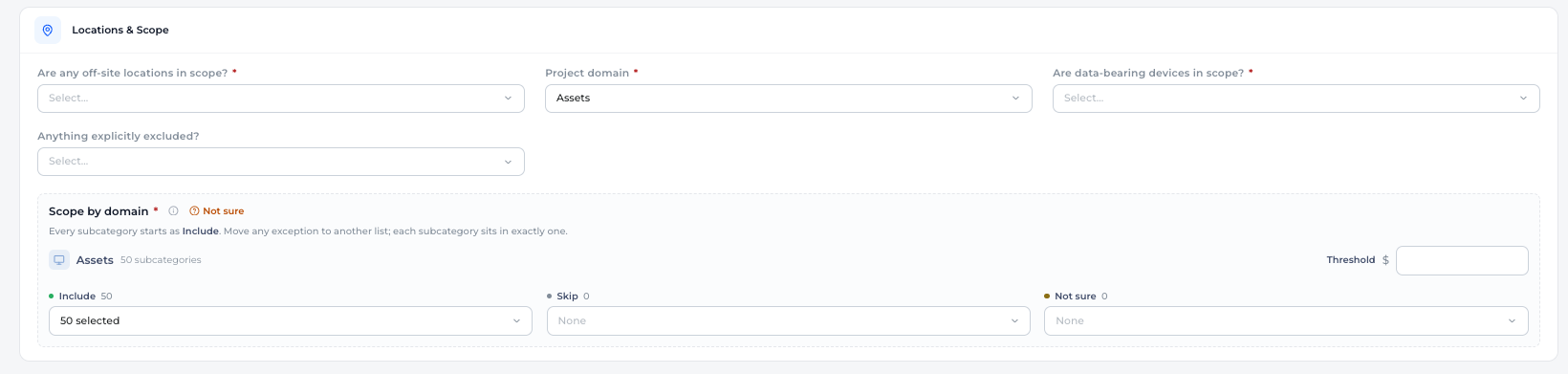
on the screenshot above-Project Domain they select at the beginning I dont think we need to see it here / impacts everything so shouldnt be interchangeable
Everything here optional not required tighten up space
Peter Stahl · 9 Oct · C23
- T21Remove “Project domain”. It is chosen when the project is started and drives everything, so it must not be changed here.remove
- T22Make every field in this section optional, and tighten the spacing.change
Existing Asset Datatwo fields go, the rest optional
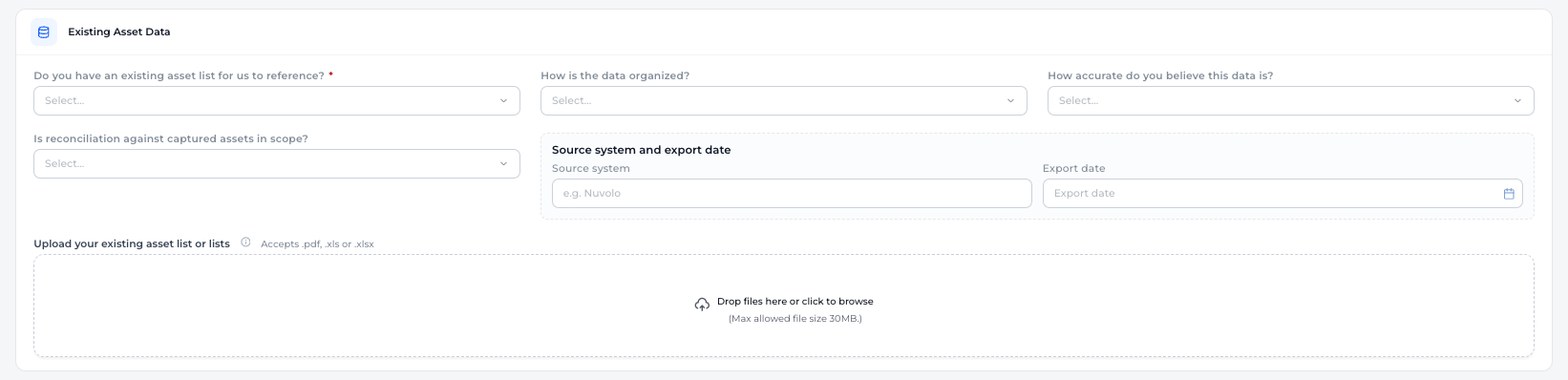
on the screenshot aboveExisting asset list for us to reference thats the cmms remove
How is data organized - remove
Others all optional
Peter Stahl · 9 Oct · C24
- T23Remove “Do you have an existing asset list for us to reference?” (that is the CMMS) and “How is the data organized?”. Make the rest optional.Assigned by position: no new name tag between this screenshot and Locations & Scope (Q3).remove
Site Access & Logisticssame as Consumables

on the screenshot aboveBump up like Consumables to second section and make same updates
Peter Stahl · 9 Oct · C25
- T24Move it up to the second section and make the same changes as on the Consumables form: T12–T16.change
Systems & Intentstays, optional

on the screenshot aboveAll fields optional
Peter Stahl · 9 Oct · C26
- T25Make all three fields optional.change
Delivery & Acceptancethree go, the rest optional
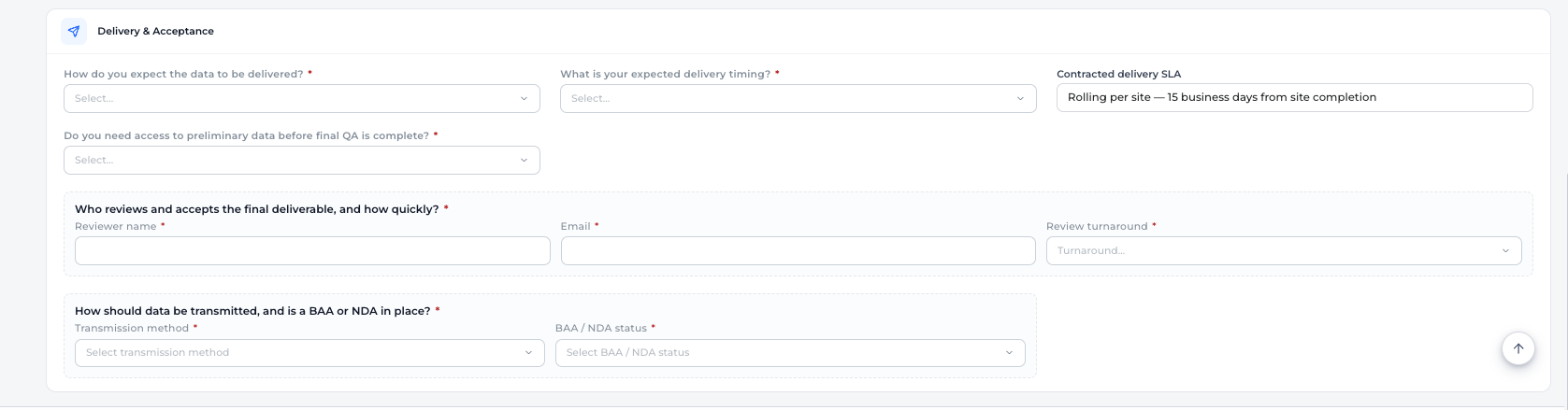
on the screenshot aboveContracted delivery SLA - Remove
Who reviews and accepts the final deliverable, and how quickly? * - Remove
How should data be transmitted, and is a BAA or NDA in place? * - Remove
All fields optional
Peter Stahl · 9 Oct · C27
- T26Remove “Contracted delivery SLA”, “Who reviews and accepts the final deliverable, and how quickly?” and “How should data be transmitted, and is a BAA or NDA in place?”.remove
- T27Make the remaining fields optional.change
Assets · Files stepStart a Project → Files · T28–T32
The step before the form: the reference files asked for when an Assets project is started.
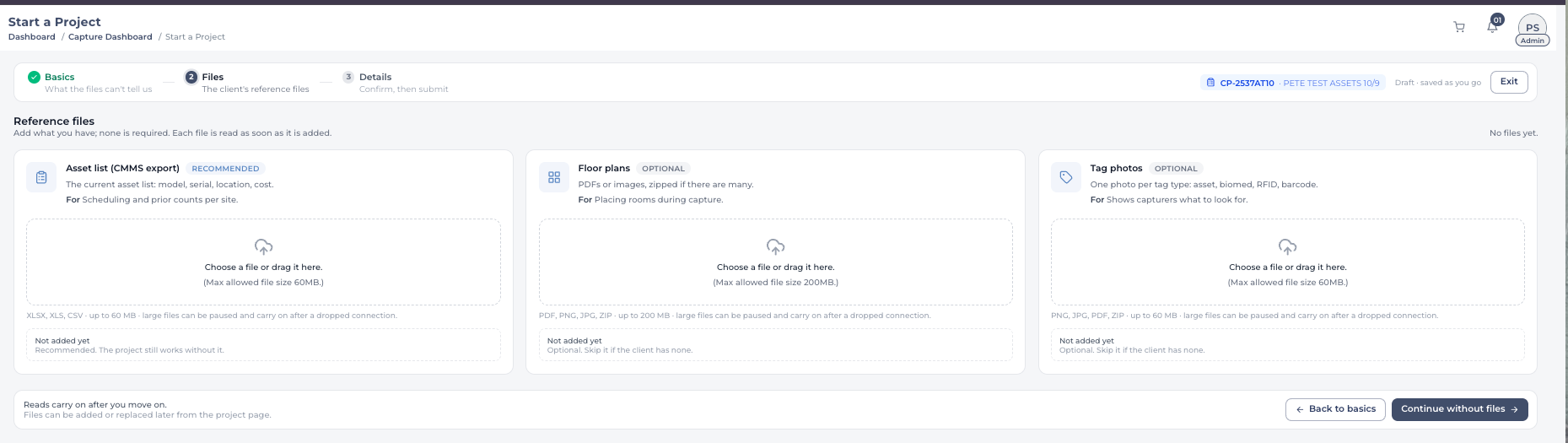
New file typesthree more cards
on the screenshot aboveAdd Service Contracts
Add Asset Registry/Depreciation Files
Add PO History/Invoices
Peter Stahl · 9 Oct · C18
- T28Add a Service Contracts card.add
- T29Add an Asset Registry / Depreciation Files card.add
- T30Add a PO History / Invoices card.add
Tag photo binsone bin per label type
on the Tag photos cardFor the Last one we need multiple Storage bins: Asset Tags, Clinical Engineering/Biomed, RFID/RTLS, CapExpert QR Codes being used? That way Capture AI knows. Also when a label comes into play we haven’t seen before it appears maybe below this and we can drag that example into the proper bucket for Capture ai on the go-forward and runs Ishitas script to do a DB update to guide where that extracted labels data goes
Peter Stahl · 9 Oct · C19
- T31Split Tag photos into separate bins: Asset Tags, Clinical Engineering / Biomed, RFID / RTLS and CapExpert QR Codes. Capture AI then knows which kind of label it is reading.change
- T32When capture meets a label it hasn’t seen before, show it below the bins so someone can drag it into the right one. Capture AI uses that from then on, and it runs Ishita’s script to update the database with where that label’s data goes.Which script, and how it is called, is open (Q4).add
Questions to settlebefore building
None of these is asked in the doc. They come from reading the comments side by side.
- Q1Systems & Intent and Delivery & Acceptance are deleted from Consumables (T17) but kept, optional, on Assets (T25–T27). If both forms share one component, it needs to switch per domain. Confirm that is the intent.
- Q2Facility Type (T2) is one choice when one facility is in scope. What should it allow when a group with several facilities is selected?
- Q3Existing Asset Data on the Assets form (T23) carries no tag of its own. It sits under the same tag as Locations & Scope, so it is listed here. Confirm.
- Q4Unknown labels (T32): which of Ishita’s scripts is meant, and can the app call it as it is?